Live Demo
Lorem ipsum dolor sit amet, consectetur adipiscing elit, sed do eiusmod tempor incididunt ut labore et dolore magna aliqua.
Lorem ipsum dolor sit amet, consectetur adipiscing elit, sed do eiusmod tempor incididunt ut labore et dolore magna aliqua.
When to use
- To organize related information.
- Shorten pages and reduce scrolling when content is not crucial to read in full
- When space is at a premium and long content cannot be displayed all at once, like on a mobile interface or in a side panel
Anatomy
Accordions can be used to group and hide content to keep an interface clean and reduce clutter. Accordions can be used to display only one or multiple panels at a time, depending on the use case.
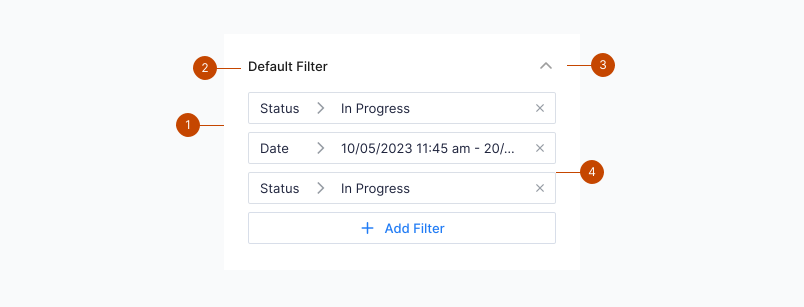
- Accordion Item
- Label
- Chevron
- Accordion Panel
Interaction

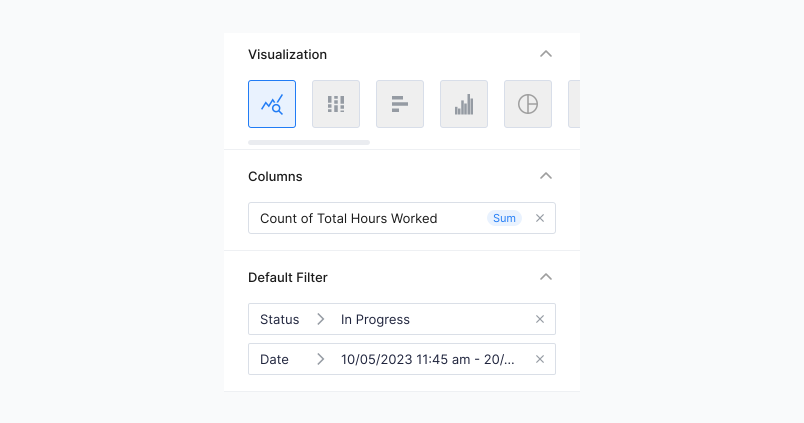
- Expanded- An expanded accordion item reveals an accordion panel with additional content. The panel is expanded and collapsed with a slide animation.
Guidelines
- Make the entire title label area clickable to trigger expansion.
- Ideal for use when you have no more than 10 modules of content.
- Do not use if it is a priority to have your users see all content at once.