Live Demo
Anatomy
Accordions can be used to group and hide content to keep an interface clean and reduce clutter. Accordions can be used to display only one or multiple panels at a time, depending on the use case.
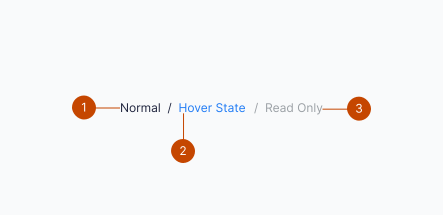
- Page title and link
- Hover state
- Separator
Interaction
- Breadcrumb has five states available for breadcrumb items — enabled, hover, active, focus, and read-only.
- If a breadcrumb bar will exceed the content width one option is to wrap the full breadcrumb trail to allow overflow to the next line.
Guidelines
- Use only when the navigation has more than two levels of depth.
- Use only when it’s necessary to inform users of their location.
- Place breadcrumbs in the top left corner, typically above the page title.
- Breadcrumbs are especially useful when users are likely to have landed on the page from an outside source.
- Show progress from the highest navigation level to the lowest, without skipping a step.
- Use the exact section names. For example, don’t shorten My Applications to Applications.